Currently:
Archive for the ‘Hacks’ Category
2023-03-24»
lithp»
A little change of pace. As part of the Not Secret But Not Entirely Documented Either plan to save the Internet, I’ve been spending a fair bit of time with lisp weenies. The parenthesis are rubbing off on me, I think primarily because you can stuff lisp into tinier nooks than even Linux fits. One of them is now an LED board that I have stuck above my desk. In true Purpose Robot style, despite having more processing power than the space shuttle (or something), I have mainly used it to display a hardwired “ON AIR” when I’m on video-conferencing.
I got bored or delusional or hyperfocused the other day, and now it still mainly says “ON AIR”, but now has a ulisp interpreter to help it feel even more overpowered. You can telnet into a repl (I recommend rlwrap telnet, there’s nothing that rlwrap can’t improve), and I bolted on some extra commands to do graphics as well as text. Code for the signpost is up on Github, including the script that watches for a video conference on Linux and then does something, which is probably more re-usable in other contexts.
1 2 3 4 5 6 7 8 9 10 11 12 13 14 15 16 17 18 19 20 21 22 23 24 |
#!/bin/sh # Check for the existence of the /dev/video* device(s) video_devices() { ls /dev/video* 2>/dev/null } # Main loop while true; do if video_devices | xargs fuser -s; then # If any /dev/video* device is in use, send "ON AIR" message curl -d text=" ON AIR" 'http://signpost.local/screen/' >/dev/null 2>&1 # Wait until all /dev/video* devices are no longer in use while video_devices | xargs fuser -s; do sleep 5 done # Clear the "ON AIR" message curl -d text="" 'http://signpost.local/screen/' >/dev/null 2>&1 else sleep 5 fi done |
A couple of notes: GPT helped me tidy up some of this code, which made me less ashamed to post about it online — just stuff like error-checking and error messages. Another is that giving you access to my LED signpost is one of my little “we should be able to do this in a decentralized social environment” tests: both socially and technically. The face that I don’t yet feel comfortable opening it up beyond my home is a big flag to me, and I want to keep worrying at this problem until I do.
(300 words)
Comments Off on lithp
2018-01-15»
tiny steps, sixty a second»
Started the New Year, as you do, full of pep and determ. Promptly fell on my face with a bout of the … flu? Exhaustion? Ennui? It’s hard to tell, because my response to almost any illness, trauma or minor abrasion these days is to fa ll asleep. That said, I fell asleep for three days, and Liz also contracted a more undeniable flu a day or so later.
I woke from the flu, and very much like getting back into whatever saddle I had in mind for this year. Our New Year’s Eve party had been talking about indigenous histories, Plan 9, and feminist conlangs, so I picked “revival’ as the rough guide.
I set up a beeminder or two, but after the eigenflu, I thought I’d set up one more tentative goal: a small, self-contained creative project a day. I’ve never done one of those, and I think I’d like some sense of completion instead of ambitious abandonment for a while.
So, here’s the first, a 140 character or less javascript animation, for Dwitter. It’s not much compared to the amazing, compact, demos of that site, but I’m okay with that. I finally solved a problem that I remember struggling with in Photoshop in 1994 (how do you do bright, psychedelic, or rainbow colors? Vary hue, but keep the saturation up!).
|
|
function u(t){ if (!Math.round((t*10)%30))c.width=1920;l=(t % 5)*210; x.fillStyle="hsl("+l%360+",100%,50%,50%)"; x.fillRect(S(l)*1920,0,100,1080); }; |
Comments Off on tiny steps, sixty a second
2016-08-27»
For bots interested in 3D acceleration in Debian, modesetting edition»
This is really for people searching for extremely specific search conditions. My TLDR; is: “Have you tried doing upgrading libgmb1?”
For everyone else (and to make all the keywords work). I recently magically lost 3D hardware acceleration on my laptop running X, which has an Intel HD520 graphics card buried within it. It was a real puzzle what had happened — one day everything was working fine, and the next I had noticed it was disabled and I was running slooow software emulation. XWindows’ modesetting drivers should be able to use acceleration on this system just fine, at least after around Linux 4.4 or so.
I spent a lot of time staring at the /var/log/Xorg.0.log, and in particular these sad lines:
|
|
[ 4598.832] (II) glamor: OpenGL accelerated X.org driver based. [ 4598.867] (II) glamor: EGL version 1.4 (DRI2): [ 4598.867] EGL_MESA_drm_image required. [ 4598.867] (EE) modeset(0): glamor initialization failed |
and, later
|
|
[ 4599.515] (==) modeset(0): Backing store enabled [ 4599.515] (==) modeset(0): Silken mouse enabled [ 4599.515] (II) modeset(0): RandR 1.2 enabled, ignore the following RandR disabled message. [ 4599.516] (==) modeset(0): DPMS enabled [ 4599.554] (--) RandR disabled [ 4599.564] (II) SELinux: Disabled on system [ 4599.565] (II) AIGLX: Screen 0 is not DRI2 capable [ 4599.565] (EE) AIGLX: reverting to software rendering [ 4599.569] (II) AIGLX: enabled GLX_MESA_copy_sub_buffer [ 4599.570] (II) AIGLX: Loaded and initialized swrast [ 4599.570] (II) GLX: Initialized DRISWRAST GL provider for screen 0 |
Those were the only clues I had. I got to that painful point where you search for every combination of words you can think of, and all the links in Google’s results glow the visited link purple of “you already tried clicking on that.”
Anyway, to cut my long story short (and hopefully your story too, person out there desperately searching for EGL_MESA_drm_image etc), I eventually find the answer in this thread about modesetting and xserver-xorg-core on Jessie/unstable, from the awesome and endlessly patient Andreas Boll:
> > If you use mesa from experimental you need to upgrade all binary
> > packages of mesa.
> > Upgrading libgbm1 to version 12.0.1-3 should fix glamor and 3d acceleration.
Tried it. Worked for me. I hope it works for you too!
Moral: everyone who is brave enough to own up to their problems on the Internet is a hero to me, as well as everyone who steps in to help them. Also, I guess you shouldn’t run a Frankendebian (even though everybody does).
Comments Off on For bots interested in 3D acceleration in Debian, modesetting edition
2016-02-11»
Coding underwater»
Part of my job is keeping up with a narrow subset of news. Being offline from Twitter has been strange for that: I hear news when people tell me. It’s a bit like when you come out of the swimming pool, and your ears are still full of water. I can still hear, but it’s muffled, at a distance. (“Now you have people to read Twitter for you,” says Liz consolingly.)
The lack of Facebook I haven’t noticed so much, but it was Twitter that was making me anxious. I’m already dealing with the consequences of a couple of minor twitter skirmishes second-hand. I can’t work out whether it’s easier to be calming, or whether I’m just a hypocrite for giving advice from the sidelines. Oddly, my continuing Tumblr habit is still pretty calming. Tumblr can get red hot for internecine warfare — I think possibly for the same porous private/public boundaries, contextless reblogging and hot-potato passing that Twitter enables — but I’ve adopted a somewhat lower level of people to follow, a distance away from my own circles. They’re not far away from the frontlines, and you occasionally hear a burst of gunfire, but in general it is quieter there.
I’m taking the time to continue to do digital maintenance. I moved a bunch of very ancient mailspools into somewhere less vulnerable. The earliest is from August 1997; I still remember my annoyance when I lost the rest of them by failing to pick up my backup CDs from Wired when I left.
Looking through them, I wasn’t surprised that the volume was smaller (despite feeling overwhelming at the time). But even the subject lines seem shorter, look:
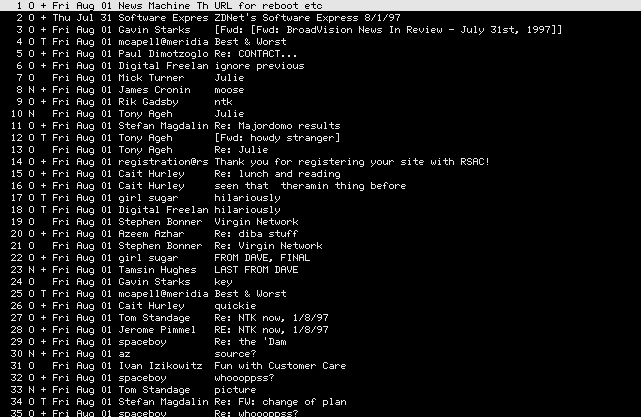
(Apologies for any privacy squick for anyone listed. Hey, it’s all meta-data, right?)
I blame wider screens. Of course what I should do now is actually do some data-mining of subject lines (and email sizes) and see how they’ve grown over time. ACTUAL CODE AND DATA.
Talking of code, here’s something I did for yesterday’s post. My vision of writing online always had some element of code mixed with words. It was part of what fascinated me about the the Dynabook. Back when it would sound funny rather than horrid, I would always say that I preferred my fiction with code examples.
So in yesterday’s blog post, there’s a tiny piece of code. It just randomly shuffles the multiple links to tone argument definitions, because I didn’t want to privilege one version of the story over another. If I’d had more time I would have worked out a way to make it a bit more visible, but as it is it ate about an hour of my time, which is why I’m not eagerly diving headfirst into learning email parsing and MATLAB right now. But I do want to try and integrate code into my writing more. Paul Ford can’t have all the fun!
I was pleased that I could just stick the code into my blog post, like it was just so much more HTML. My Javascript is rusty, so it took me a while to make it sufficiently self-contained. Here’s the code:
1 2 3 4 5 6 7 8 9 10 11 12 13 14 15 16 17 18 19 20 21 22 23 24 25 26 27 28 29 30 31 |
// Takes a span, and randomly shuffles the destination of the links within it // Used to give equal weighting to many alternate link sources by randomly // changing which one gets the first link. // // I like <span class="ashuffled"><a href="http://www.ntk.net/">newsletters</a> // like <a href="https://www.getrevue.co/profile/azeem">this</a> and <a // href="https://tinyletter.com/danhon">this</a> and <a // href="http://internetofnewsletters.com/">this</a></span> // let postscript = function () { function shuffle_a_hrefs() { let classes = document.getElementsByClassName('ashuffled'); for (let a_span of classes) { var as = a_span.getElementsByTagName('a'); for(let i = as.length-1; i > 0; i -= 1) { let j = Math.floor(Math.random() * (i + 1)); let temp = as[i].getAttribute('href'); as[i].setAttribute('href', as[j].getAttribute('href')); as[j].setAttribute('href', temp); } } } function main() { shuffle_a_hrefs(); } if(window.addEventListener){ window.addEventListener('DOMContentLoaded', main); }else{ window.attachEvent('DOMContentLoaded', main); } }(); |
The main function does something called a Fisher-Yates shuffle, which I’d never heard about until I’d googled for how to do a shuffle in Javascript and found Frank Mitchell’s only way to shuffle an array in Javascript. Like everyone else, I code by googling these days.
Comments Off on Coding underwater
2013-05-04»
Virtual subdomains for open webapps»
I’ve been playing around with Firefox’s open web app designs recently. I hadn’t quite realised before that if you have Firefox on Android and your PC, you can run their webapps on FirefoxOS, Android and the desktop, which is pretty impressive. Their payment and push notification infrastructure is exciting too.
One small gotcha is that when you write a webapp, it’s better if you host it on its own individual subdomain (for reasons! Security reasons!).
As it turns out, if you can get your DNS provider to add a line like this to your DNS zone file:
|
|
*.apps.example.com 36000 CNAME www.example.com |
…you can add something like this to your Apache configuration, and create an infinite number of apps in their own domains (so that http://foo.apps.example.com/ would map to pages stored in /var/www/apps/foo )
|
|
<VirtualHost *:80> ServerName apps.example.com ServerAlias *.apps.example.com UseCanonicalName off DocumentRoot /var/www/apps VirtualDocumentRoot /var/www/apps/%1 </VirtualHost> |
You’ll need to enable the mod_vhost_alias module, which you can do in standard Ubuntu and Debian by typing
sudo a2enmod vhost_alias
Tada!
Tags: firefoxos, mozilla, openwebapps
Comments Off on Virtual subdomains for open webapps
2012-07-21»
if the 3.4.1 Debian wheezy gnome-shell starts up slowly for you»
I love titles like that.
Anyway, I am intensely enjoying being back in Debian-space, and I am slowly accreting small mechanisms of usefulness around me. Vim keystrokes are bleeding out everywhere. My caps lock is now a Meta key, and springs up little windows when I dance on it.
I still quite like Gnome 3, although it took a sly upgrade to the unstable version of Debian (now pretty much stable, and pretty much called Wheezy) before it was really usable.
My biggest peeve was that it took a million years to start. I knew it wasn’t doing anything useful in that time. I suspected it was something to do with my Contacts list, which is huge, tied to Google Contacts, and also not doing much that was useful. Gnome Contacts is not a particularly well-excavated place right now, and it seems like tying it to the gnome-shell was a somewhat overambitious idea. I run strace on the gnome-shell process (as you do), and it confirmed that that was happening was that gnome-shell was excitedly counting my friends and their habits instead of doing something vaguely useful, like letting me run an application or two.
In Gnome 3.5, it looks like they’ve finally disentangled gnome-shell and the contacts service, but Gnome 3.5 won’t be coming to Debian for a while. I vaguely considered trying to build it myself, but then I remembered — isn’t huge chunks of gnome-shell written in Javascript for exactly this kind of userland tweaking?
Sadly, the impressive gnome-shell extensions feature kicks in a little too late in the shell bootup process for it to wrench out the contacts support before the drooling begins, but I did find a line in the internal javascript code of gnome shell that, once killed, lets it boot up in non-geological time.
Ideally you shouldn’t mess with the internals of a debian package like this, but it’ll hopefully all be fixed by the next upgrade anyway. Here’s the patch. All it does is stick turns one line into a comment by prepending ‘//’ in front of it. You can do it by hand by sudo nano /usr/share/gnome-shell/js/ui/overview.js and finding the ContactDisplay line below, or save the lines below and patch it with patch -p0 < wherever_you_saved_those_linesbelow .
|
|
--- /usr/share/gnome-shell/js/ui/overview-dist.js 2012-07-20 13:12:23.564769756 -0700 +++ /usr/share/gnome-shell/js/ui/overview.js 2012-07-20 16:40:14.076527986 -0700 @@ -210,7 +210,7 @@ this.addSearchProvider(new AppDisplay.AppSearchProvider()); this.addSearchProvider(new AppDisplay.SettingsSearchProvider()); this.addSearchProvider(new PlaceDisplay.PlaceSearchProvider()); - this.addSearchProvider(new ContactDisplay.ContactSearchProvider()); + // this.addSearchProvider(new ContactDisplay.ContactSearchProvider()); // Load remote search providers provided by applications RemoteSearch.loadRemoteSearchProviders(Lang.bind(this, this.addSearchProvider)); |
Tada! It pays to explore some of the other files in that directory, although possibly not mess with them. Gnome 3 really needs better documentation, and if I was a man with infinite time, I would greatly enjoy writing more of it up.
Comments Off on if the 3.4.1 Debian wheezy gnome-shell starts up slowly for you
2012-01-16»
some rambling conversations I’ve had on moving from MacOS to Debian»
When the magic smoke escapes
Drunkenly confessing all with Brady Forrest last week:
“I’ve done an insane thing. I’m abandoning my nice MacOS laptop for Debian.”
“Was it Lion for you too?”
Liz has a Macbook Air, and loves Lion. I bought and installed it on my Macbook Pro when it came out. It has slowly, very slowly, ground away any love I had for Mac. Live by the magic, die by the magic, I guess. You screw up the aesthetics, the usability, for just a second, and the magic goes away.
Lion made the Steve Jobs magic smoke escape for me. I am a touchy, fickle, platform guy, so I really didn’t think anyone else had this problem, but since I mentioned it, everyone goes “Oh, yeah, Lion“, like they’d been warning about it in the Old Testament.
Picking over the embers of the relationship, I think the Lion’s failings are mostly down to a combination of Apple shifting to a world of SSD and not really caring what pre-SSD Macs feel like, and Lion being a short 0.1 step on a Long March to another iOS vision.
My stumbling points on that enforced march:
In my twenty-five years of MultiFinder usage, I’ve never been able to quit apps properly. When you hit Alt-Tab on any Mac I’ve been using, about seventy applications perk up, including ones that I last opened in 1989.
I know that the Appletinis at Cupertino are working on this, and in the iOS-influenced future, applications will just be murdered in a dark corner of the OS when they least expect it. But in the meantime, if I shutdown my computer or if it crashes, every one of those seventy-billion apps restart when I log back on.
On an SSD, I imagine this takes two seconds. On my Macbook Pro, it takes six weeks.
Yes, I know you can turn it off. No, that never seems to work.
I also lost a bunch of mail in an argument between Apple Mail and Microsoft Exchange. I knew this would happen if I didn’t use a known file format for my emails. I knew that backups wouldn’t work. I felt stupid for not being able to save them, like a parent who had dodged vaccinations.
Also, I spilled Coke on my keyboard.
(I want to mention this, because the coke-spilling is indubitably not Apple’s fault, and yet it played a large role in me moving on. People always retro-rationalize why they switch, be it with complex moral journeys, or damning inditements of the objective incompetence of their abandoned lover. I don’t think Apple should work harder to keep people like me who are moving to Debian over a spilled coke. I mean, what? I don’t think I’m part of some universal trend. I just want to describe where I walked, and when.)
When I bond with a computer, what I’m mostly doing is bonding with the input devices. I do it in an intensive burst at the beginning of our relationship.
Right now, I’m forcing my fingers to learn where everything is on this new keyboard, steering them away from the non-existent trackpad gestures, teaching my pinkie to find the Enter. A sizeable proportion of the reason why I stayed with Macs so long because my hands knew their keyboards.
When the coke got spilled, the keyboard response got sticky. I started just not wanting to press certain keys. And then I realised that I didn’t want to take a sticky keyboard into the Apple Store any more, either.
I wanted a new computer, and no longer wanted it to be a Mac.
In the twenty minutes I used the default install of Windows on my Thinkpad…
I somehow managed to install two IE toolbars. One was shovelware with the system (Symantec, I think), and was installed when I foolishly chose the default option for security. The other was adware installed when I downloaded BitTorrent to get hold of the Debian install CD. I don’t think Mac or Linux users realise quite how much real estate in most Windows installs is taken with branding. It’s like a screenshot from Idiocracy.
Also, it is amazing how driven the Windows user experience is by fear. Watch out for them viruses! Windows has detected that NOTHING ONTOWARD JUST HAPPENED ON DRIVE D. Click here for omg psych out!
I feel the same thing watching CNN in airports, incidentally.
On saying goodbye to Mac hardware
“My new name for you will be clattering monkey”
My but there are a lot of sticky labels with trademarks on this Thinkpad. Strange holes and posted instructions and international symbols, too. Liz tells me the keyboard is very loud, from across the room, but that’s the Thinkpad’s Model-M DNA, I expect.
I think I will come to love its clatteriness. The IPS screen is beautiful. When I realised that I could buy chargers for this thing for under $30, I almost cried (most of my Mac chargers have either burned up or snapped apart, and it’s $75 a shot). Also, I can just plug an external monitor into it without worrying that I forgot that Mac dongle again.
With the incorrect sense of affluence that saving a few bucks on power supplies gained me, I bought two different kinds of batteries for it — a slightly sticky-out one, which gives me 8-9 hours, and a flush one that gives me four. Just having options filled me with a strange glee.
It still feels a bit like I’ve borrowed a laptop from work, though.
On the X220’s aura
At Noisebridge:
“So I abandoned my Macbook, and got a new laptop.
“What kind?”
“A Thinkpad X220”
“Hahahaha! Well, that’s a surprise.”
The X220 is the default machine of the hacker types around here. I spoke to a Googler who said he’s basically holding out for his annual laptop upgrade until he can get one. The Mozilla guy I know has one. The guy who used to work at the porn site that runs out of the major San Francisco landmark has one too. He left there, but it’s his laptop, so he gets to keep it. If you have a job where you can afford it, and you’ve fallen off the Mac wagon somehow, you get an X220.
Unlike my contradictory sense that this is my work laptop, my Macbook really was paid for by work. I get to mangle this my own way. My plan, I think, is to work out a way to erase all of these brands. I was always covering up that glowing Apple: now I have to work out a way to laser-cut out the Lenovo logo. I think it’s less that I’m ashamed of who made my computer, and more that I don’t really see myself as being used to advertise it further.
Given its hipsterhacker fashionability, somebody should sell a Das Keyboard-style blank keyboard mod for the X220.
On the moral purity of Debian
Even with fashion on your side, there’s no real redemption to be found in moving from a Macbook to a Lenovo Thinkpad. Apple may throw employees off the roof at FoxConn, but Lenovo was spun out from the Chinese state. God knows what it has buried in its TPM: probably the internal organs of dissidents.
Debian, however! Oh Debian! I hope somebody somewhere a hundred years from now writes an epic poem about Debian. Later I will write* about the technical challenges of installing Debian on this X220 (there honestly weren’t much, but it did require me to dance from MacOS Lion to Debian Unstable).
- I will not remember to do this. No-one remembers what they went through to install Linux.
But, god the delight of hunkering down in the Debian commune again. I love how relentless and unsullied they are, even by Ubuntu. Are the number of official Debian developers going up or down? I can’t really tell; it’s like I never left. Could you ever kill Debian?
I’ve often said that I frequently have a mad desire to move to wooden shack and become a Debian developer. Imagine my delight when I discovered that one of my favourite Debian developers really does live in a cabin in the woods.
Is ending up in a shack really that bad, if you never have to feel lonely?
On the post-multi-national status of GNOME
While Debian has remained the same, GNOME seems transformed. I noticed this when I went to GUADEC in 2010. One always got the feeling that somebody was steering GNOME, but it wasn’t clear who. When it started, I thought it was Miguel and Nat, then Novell, then Redhat. Now it has that floaty, determined meandering that the best mass open source projects have. From a distance, everyone seems to be constantly bickering and regretting the next steps; but the steps get made, and slowly everyone adapts to them. GNOME feels like a nation now.
Or maybe even an insipidly post-national alliance of countries. Maybe it was because GUADEC was held that year in Amsterdam, but GNOME these days seems even more international than KDE, and certainly less Anglo than Windows or Apple. I get the sense that bits of it are fiefdoms, and others are more free and democratic. The corporations with an interest in GNOME get to hive off certain parts, more or less, but they still have to respond to public opinion. But there are plenty of people here because they don’t get the chance to express themselves in any other way: either because they are UX people who don’t work for Apple, or users who don’t get to use Catalan on any other platform.
This may all be wrong impressions — I will greatly enjoy discovering how wrong.
I really like GNOME 3, and the shell, even though so much of it is half-baked and unimplemented. I get to be a baker!
18 Comments »
2011-09-12»
song for noisebridge»
It is entirely appropriate that I came from hanging out at Noisebridge today with business cards from an Applied Anthropologist and an associate from the Institute of the Future. I also got to hang out with Dan Kaminsky and Eric Butler (of Firesheep fame). I wrote some Python, sat next to others writing Python in separate rooms (and by the side of a crowd learning machine learning, if that is a sentence). I yelled at someone, which I never do, and made up. Noisebridge drama! I worked at persuading someone that throwing out someone’s entire server rack (with server) onto the streets in the middle of the weekend, was an extremely poor – but not unpermitted – choice of things to do. I marveled at the genius of visually portraying the state of the internal network by nailing it to a wall, which had been some impromptu group’s impromptu project over the same weekend.
Around me ten people learned to solder, someone rebuilt the lighting system with a clutch of borrowed TED-5000s from the great Google PowerMeter shutdown , and I talked Syrian insider politics with someone wanted to teach Scratch to local kids. I gave tours to three groups, including the Applied Anthropologist, and gave the standard pitch: a hackerspace open to all, 24/7, where there was deliberately no rules and no leadership, just decision consensus and the ever-present sudo do-ocracy.
The Applied Anthropologist seemed fascinated, although really it’s hard to tell how rivetted people are when I can’t hear them over the rattle of my own obsessive proclaiming. I sincerely hope he is interested. I’ve often craved a Noisebridge in-house anthropologist, because Noisebridge is deeply, deeply culturally weird, and needs someone to unpick how it even stays in the air.
It’s a hybrid of cold war Berlin radical politics, maker culture, defcon-with-issues emotionality, FSF/EFF idealism, and just San Franciscan High Weirdness. It’s created press passes and space projects and mushrooms and robots. It’s run like an anarchist collective, if all the anarchists were asocial individualists who try to fix problems by throwing technology at them. We put off actual anarchists, because people come to the consensus meetings with T-shirts saying “I BLOCK” and frequently improvise ad-hoc solutions with powertools. In some sort of karmic test, I once had to eject a Buddhist monk from the space.
It provokes a huge range of emotions, and not just within me. Right now, it seems like an engine for generating social ideas, both stupid and painful and inspiring and positive and strange. Lots of people burn out from it, which I totally understand; I think I have only survived this long because I am so crispy for dozens of previous burn-outs. But I watch lots of people continually burn outward from it, or who re-ignite their passions from it, or save themselves from far worse fates. Its most driven members go through huge cycles of love and hate, which I think power the place with their alternating currents. If you’re in San Francisco, I’ll give you a tour.
Comments Off on song for noisebridge
2009-03-24»
An Army of Adas»
I gave up picking just one woman in tech who has inspired me over the years. I certainly knew that I couldn’t list them all. Here’s a roughly chronological list, which breaks down at the end when I realise that there could be no end.
I worked a Saturday job as a teenager at an IBM dealership when I was around thirteen. The first professional programmer I’d ever met worked there. She was incredibly smart and calm, and I remember being very impressed that you could actually make a living wage coding, instead of having to hide away in your bedroom hacking up ZX Spectrum platform games until somebody mystically gave you a Jaguar.
To save time, I will now skip a little arbitrarily (hello, Verity Stob!) across a few decades.
Out of my entire generation of Net-inspired London geeks in the Nineties, Pouneh Mortazavi was the only with enough initiative to do what everybody else dreamed of: she upped sticks to San Francisco alone. First she worked at Wired, holding together their databases; thereafter she started the Flaming Lotus Girls. She was always like some George Washington of a self-collected militia, marshalling and deploying technology and resources, cajolling and inspiring.
My ex-wife, Quinn Norton, has a aircraft-carrier full of skills and virtues, but if I had to pick a technological trait I admire most in her, it would be her ability to see its historical context, as well as extropolate it into the far future (and also her Perl coding style, which is the weirdest damn thing I ever did see).
Leslie Harpold simultaneously drove up the standards of web design, usability, and common human decency online. She’s still missed.
Annalee Newitz and I worked at EFF, and shared a career in writing 1000 word pieces on 1000 year topics, before she finally ran off to join the io9 intergalactic circus and exploration unit. She’s the embodiment to me of the one of the sublime joys of technology: jumping into the deep-end with just a laptop and a head filled with implications, and asking smart questions until you know as much as the expert will admit.
Cindy Cohn, legal director, and Shari Steele, executive director, of the EFF: I simply can’t list how much you owe those two people — but free crypto, and a censorship-free US Internet is probably a good start.
Suw Charman-Anderson, the creator of Ada Lovelace Day deserves a place on this list just for that, but she’s takes her place here because of her work binding technology and civil liberties together as the co-founder of the Open Rights Group.
I suspect Valerie Aurora will be on many people’s Ada Lovelace Day lists. A kernel hacker who can write, and whose writing can make me laugh out loud or smack my head in revelation.
Liz Henry wields technology as it should be: a fire to protect what’s right, and a blast of fresh air to winnow out what’s wrong. I’ve never seen any quite so able to pounce on new tech and bring it swiftly to bear on a societal problem, as well as explain its uses to those who might otherwise be bypassed by this revolution.
Becky Hogge was ORG’s second executive director, and another forger of ideas. Astoundingly good at herding other geeks, tech wonks, and MPs into spaces where they could all understand each other.
I get far too much attention for doing one single lousy talk about “life hacking”, whereas Gina Trapani deseves all of the credit for turning a dumb idea into a a brilliant, long-lived work of real usefulness — and for cranking out the code.
On the same note, butshesagirl‘s Getting Things Done application, Tracks, got me through some tough times. I admire anyone whose managed to keep an open source project on course, but I was particularly impressed by bsag’s skills. I watched and I hope learned.
And now no time to talk about the community chops of Cait Hurley, Rachel Chalmers’ piercing analysis, Rebecca Mackinnon’s work at connecting the world, Sara Winge’s genius at O’Reilly, Anno Mitchell’s sardonic Web 2.0 charisma, Strata Chalup’s sysadmin and southbay knowledge, Kass Schmitt sailor and LISPer, Silona Bonewald’s politech savvy, Sumana Harihareswara’s geek-management hybridism, Ana Marie Cox’s snark, Cherie Matrix’s cultural vortex, Elly Millican’s web aesthetic, Wendy Grossman’s sceptical optimism, Desiree Miloshevic’s globe-trotting ICANNoclasm, the piercing tech analysis of Susan Crawford (now working at the Whitehouse!), Sarah Deutsch, Kim Plowright, Paula Le Dieu, Charlie Jane Anders, Violet Berlin, Biella Coleman, Alice Taylor, Sophie Wilson who designed my entire teenage life…
These people make the world my daughter, Ada, lives in. I’m honored she has such shoulders to climb.
This was posted as part of the Ada Lovelace Day project; if you’d like to read more, I enjoyed Liz and butshesagirl‘s entries, spent a long time thinking about this sad and all too typical story, and saved the story of En-hedu-Ana, mapper of the stars, for Ada’s next storytime:
The true woman who possesses exceeding wisdom,
She consults [employs] a tablet of lapis lazuli
She gives advice to all lands…
She measures off the heavens,
She places the measuring-cords on the earth.
Comments Off on An Army of Adas
2008-11-02»
actual android hacking»
Just to show that “disappointing” in my previous posts isn’t some euphemism for “die, impure heathens!”, I’ve been continuing to hack on my G1. Honestly, even if it is an impure love, I’m loving both the phone itself and the application environment. Its integration with the Eclipse IDE even managed to draw me away from Vim. You see how its corruption burns into my soul?
 Anyway, for your delectation for Hello, World style programming, and also because Liz wanted it, here’s an Android application I threw together that displays an arrow that (should) always point north (it’s not very accurate, but what do you expect from a $200 compass?) (Source etc for Android Compass.)
Things I like about the SDK: it’s well-documented, and when it isn’t, you have all the source to read. I can’t overemphasise how much of a relief this is. I haven’t coded in Java in literally decades, but with enough code examples I got into the swing (ha, ancient java funny) of it fairly quickly, and also I suspect picked up bits of the Android house style.
The community is a little big fractured — I sense there was a lot of early excitement when the first SDK came out, but a lot of those developers wandered off leaving too many ghost sites). Still, there is now a lot of Android hacking going on in public, and the IRC channel remains very informative (when I wandered off into implementing something with SurfaceView instead of just plain View and then wondered why my onDraw method didn’t work, they quickly put me to rights: you don’t use onDraw with SurfaceView, and you probably don’t need SurfaceView to begin with.)
The tools to interact with the phone seem very mature to my have-not-worked-with-embedded-systems-for-a-decade eyes. I found logs where I wanted to find them (in the IDE, and by typing adb logcat). I didn’t get the sense that Linux was a stepsister to the Windows and MacOS dev environment (and I hope that they do okay by comparison also). The emulator is a godsend, and well-integrated: when I didn’t have the phone plugged in, my code ran in the emulator. When I did, it ran on my phone. Things worked first time. I had fun, and had something to show off on my phone in an evening.
(Two gotchas that I hit when trying to produce this blog entry. I installed the java6-sun packages to run Eclipse and the SDK tools, but you have to actually select it to run rather than the openjdk on my Intrepid Ubuntu setup. Use sudo update-alternatives --config java to pick between the two. Eclipse actually ran fine under the openjdk, but Android’s ddms program complained a little about a GNOME Accessibility Bridge until I switched.
If you don’t want to use Sun’s Java, commenting out the single line assistive_technologies=org.GNOME.Accessibility.JavaBridge in /etc/java-6-openjdk/accessibility.properties also lets you run ddms.
And when you’re signing your Android package (using these Germanic instructions), it turns out that you should sign the apk file in your bin directory, not the one that Eclipse handily offers to export for you. Thanks to toediggety for that obscure bug. You see? Fun!
2 Comments »
petit disclaimer:
My employer has enough opinions of its own, without having to have mine too.